Professional Order-Flow Tools

Read the Order Book. Trade With an Edge.

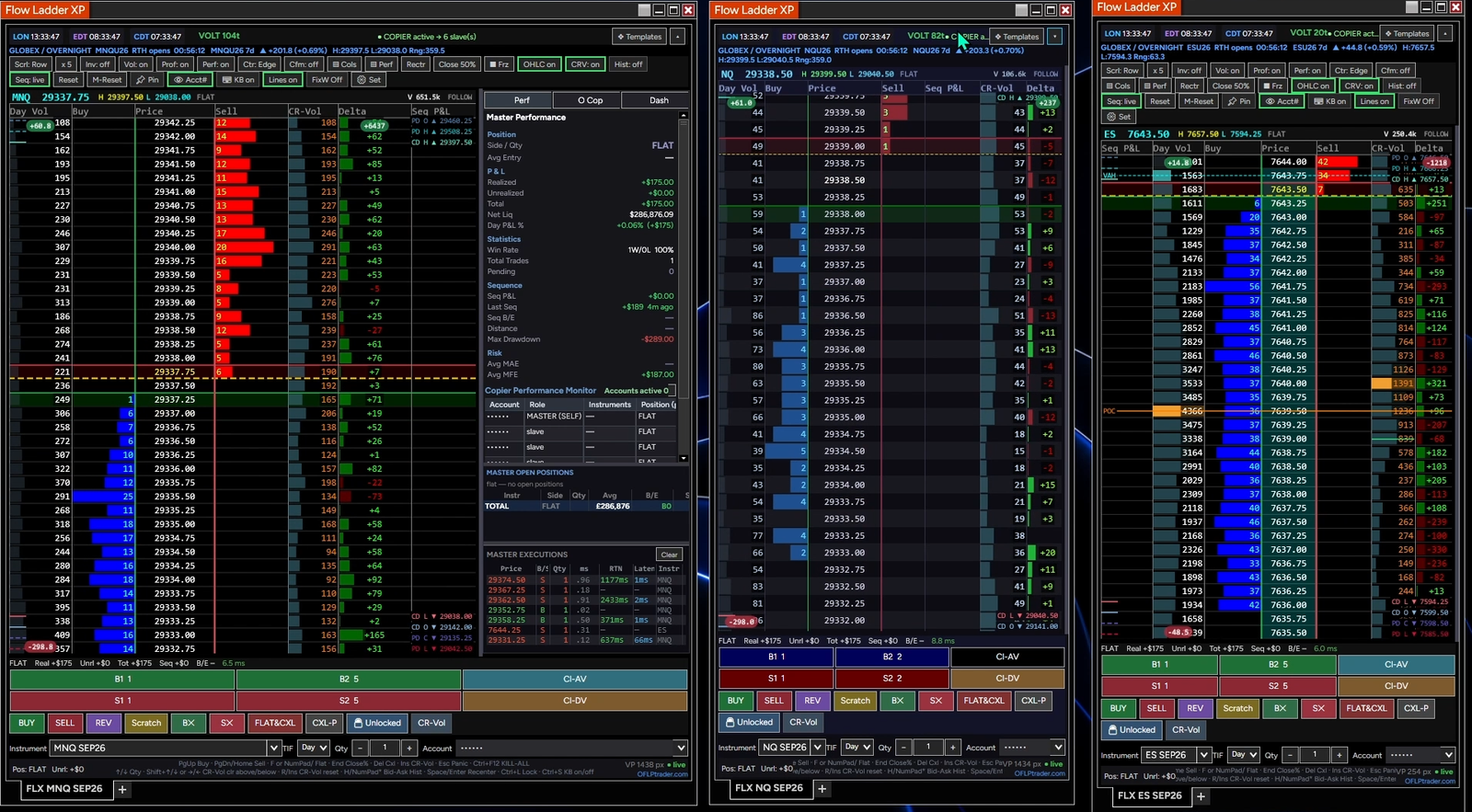
Flow Ladder XP is a complete depth-of-market trading cockpit — read order flow, enter trades in one click, copy across accounts, manage risk, and monitor your performance live.

Order-Flow Ladder
Trade Copier
Performance Monitor
Emergency Close · All Accounts
Any Broker · Auto-Detected
Just your email to start.

No card, no payment details for the trial. And if you buy and change your mind, email us within 14 days for a full refund — no reason needed.

Emergency Close
One button. Everything flat.

This is a real emergency stop, not a per-ladder convenience. It acts across every account connected to NinjaTrader 8 — including positions and orders you placed from NinjaTrader's own DOM, charts or any other window, not only from Flow Ladder XP.

Every open position closed
Every pending order cancelled
Every copier stopped at once
Our ladder or any other DOM or window

Every account, every window. No hunting for what is still open — one action and you are out of everything.

One-click entry· Multi-account copier· Live performance monitor· Emergency close across every account

Works with any broker or prop firm that connects to NinjaTrader 8 — every account is detected automatically, with nothing to configure.
Native NinjaTrader 8 addon · 14-day free trial · Email address only

Flow Ladder XP order-flow trading cockpit
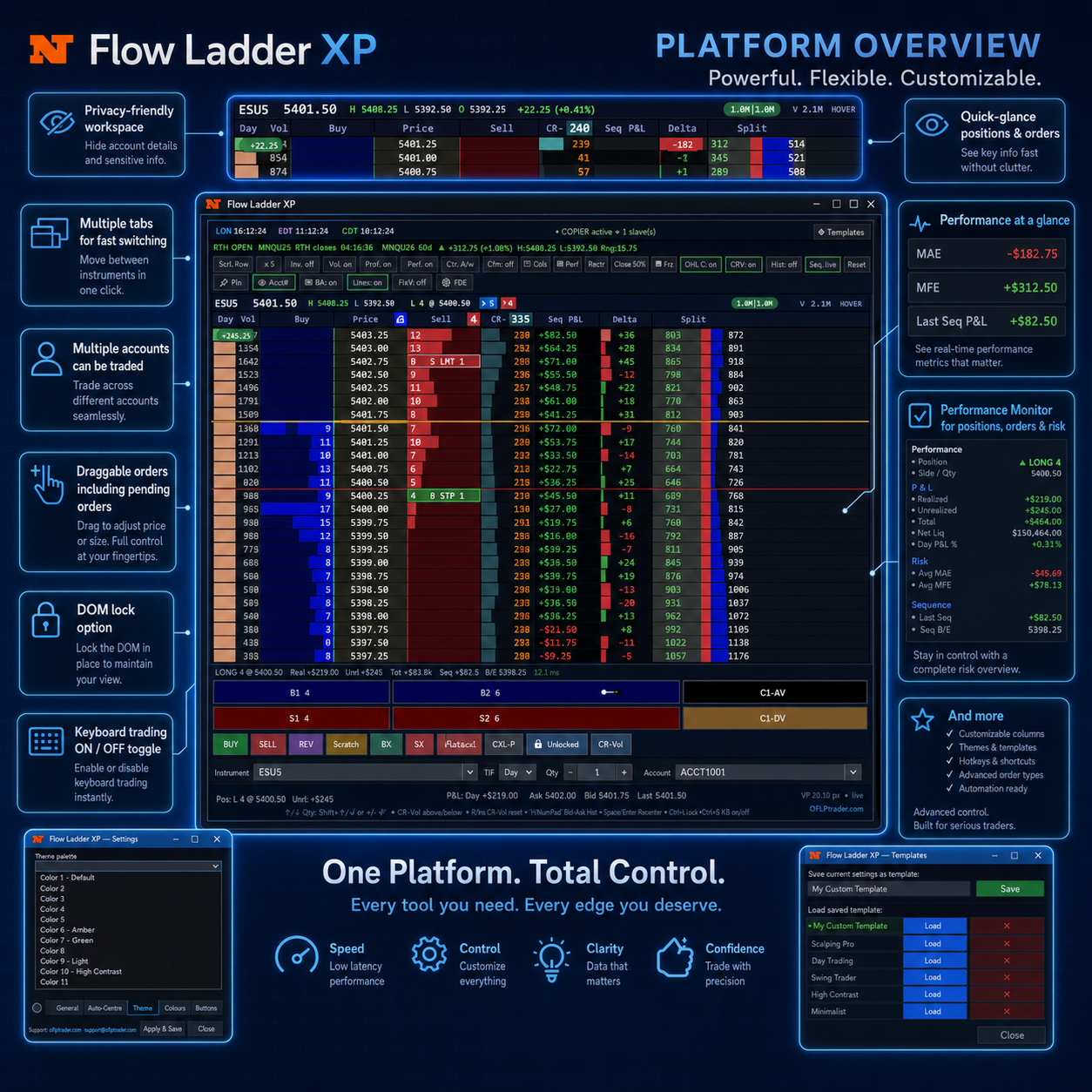
EVERYTHING AT YOUR FINGERTIPS

Powerful Controls.
Built for Fast Execution.

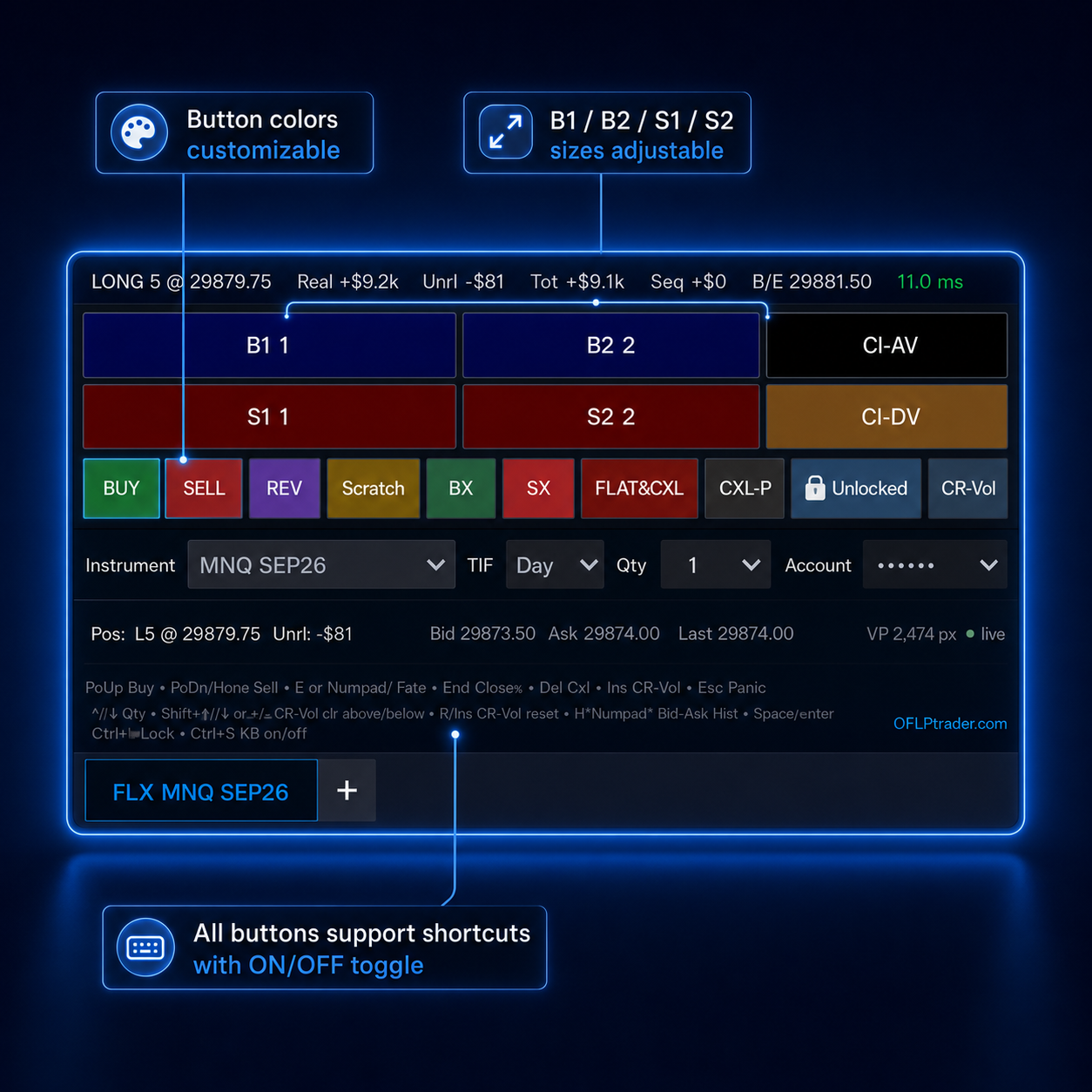
Essential DOM controls designed to keep your trading workspace fast, organised and fully customisable.

Private Workspace

Hide sensitive account and trading information instantly.

Multiple Tabs & Trade Copier

Run separate DOM tabs and copy trades across selected accounts.

Multiple Accounts

Switch between connected accounts without disrupting flow.

Draggable Orders

Move working orders directly on the ladder with precision.

DOM Lock

Prevent accidental movement while actively trading.

Keyboard Trading

Enable or disable rapid keyboard-based order entry.

Flexible Columns

Show, hide and organise columns around your strategy.

Reorder Columns

Drag columns into the exact order your workflow requires.

Resizable Interface

Adjust text, spacing and visuals for maximum clarity.

Custom Colours & Style

Personalise colours and layouts to match your workflow.

Session Scope

Control trading by session.

Auto-Cancel When Flat

Clear orders automatically.

Timed Shutdown

Stop trading at a set time.

Emergency Kill

Cancel orders immediately.

Orders on Header

View key order information.

One Cockpit. Every Edge.

Built for Speed, Ready for Prop

A flicker-free order-flow ladder that renders per frame, copies trades across every account, tracks your performance live, and keeps you inside the risk limits prop firms demand.
Flow Ladder XP complete order-flow DOM overview
The Complete DOM

Every level, one screen

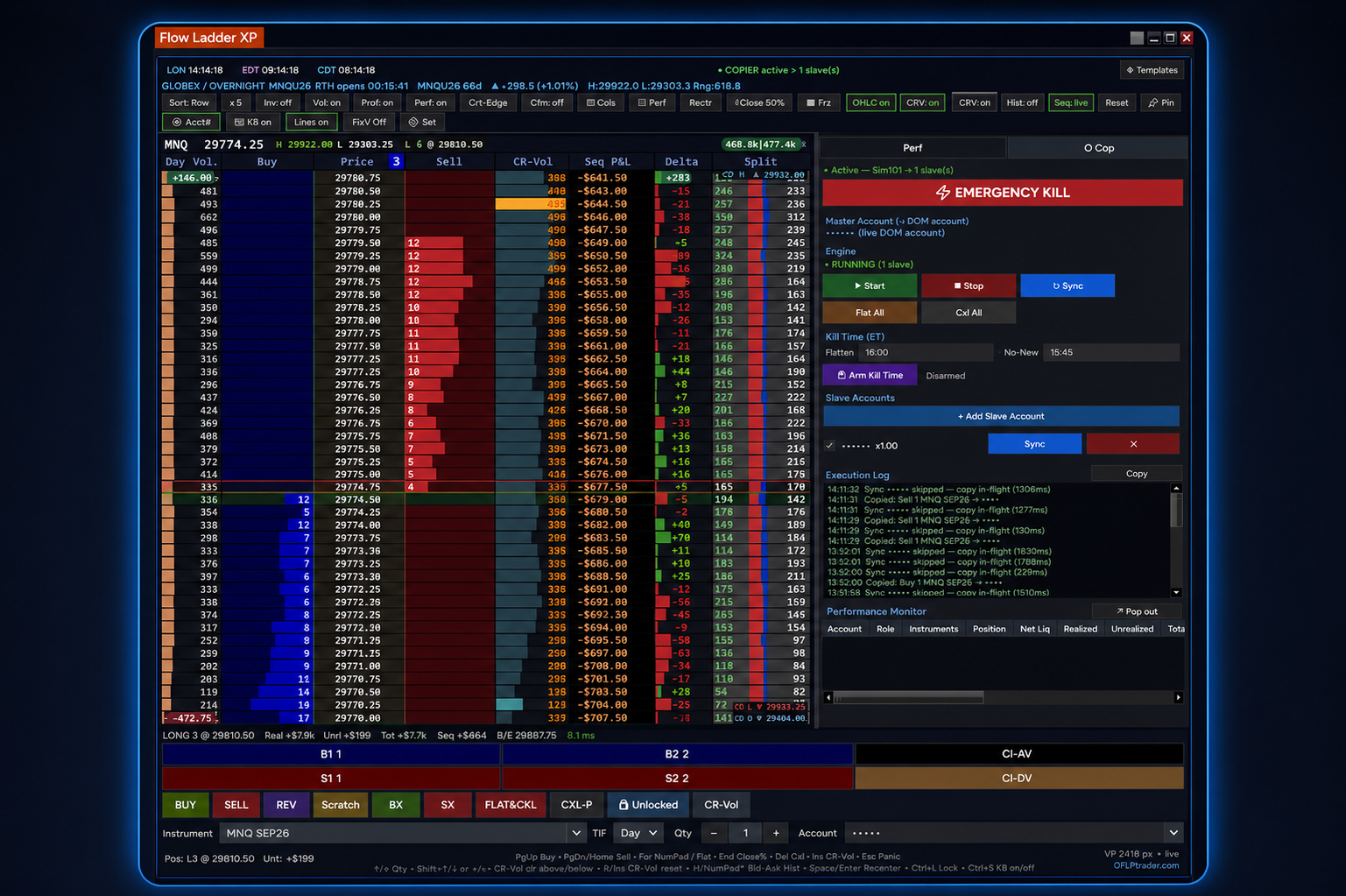
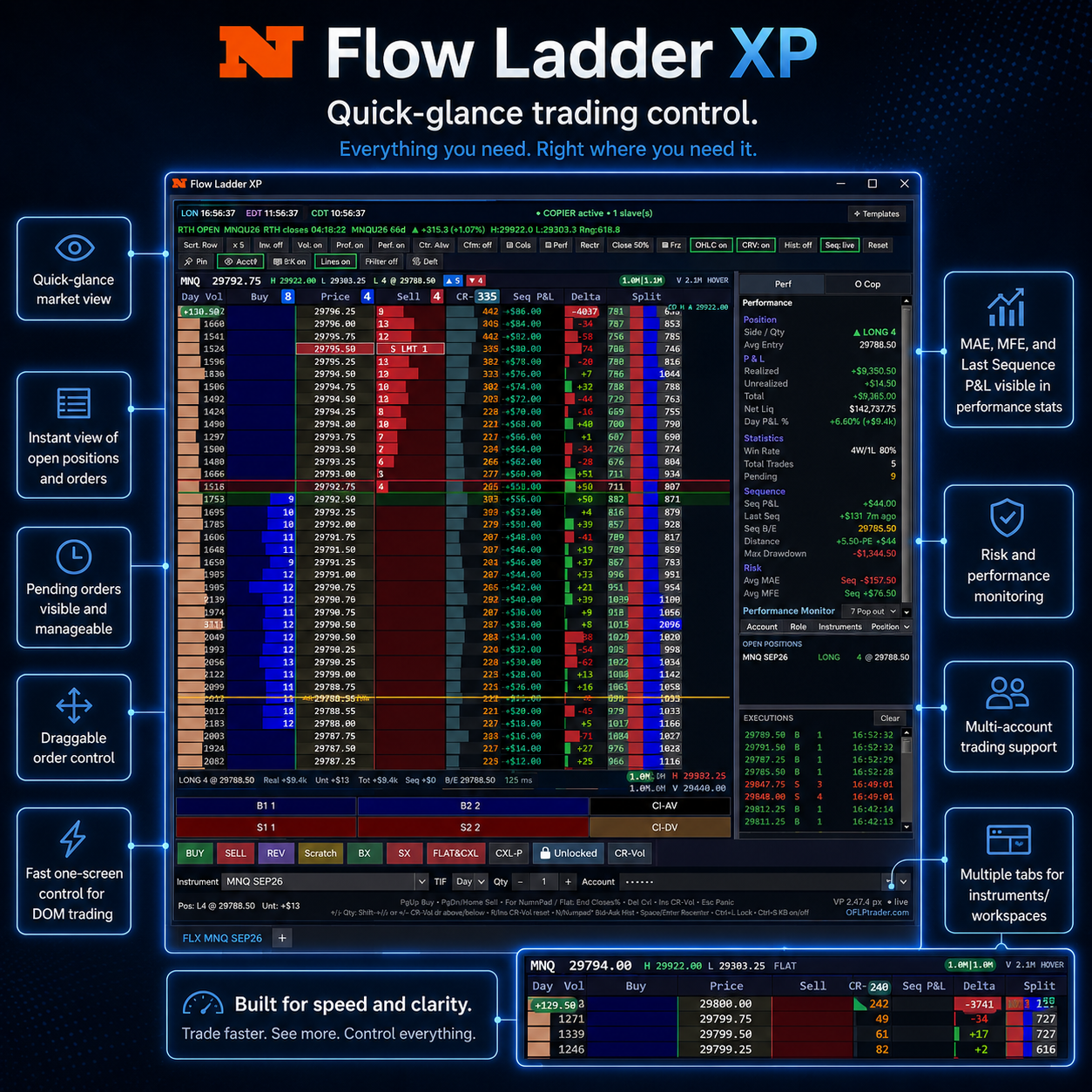
Depth, order flow, volume, delta, positions and executions — the whole book in a single fast workspace.
Flow Ladder XP order-flow ladder rendering fast tape
Speed

Renders per frame

Smooth, flicker-free tape even in the fastest markets.
Flow Ladder XP live performance and risk monitor
Performance

Live P&L & risk

Realised/unrealised P&L, MAE, MFE, sequence stats and drawdown at a glance.
Flow Ladder XP multi-account trade copier controls
Trade Copier

Copy every account

Mirror entries and exits across accounts in real time from one ladder.
Flow Ladder XP multi-account and instrument switching for prop trading
Prop-Ready

Pass & fund with confidence

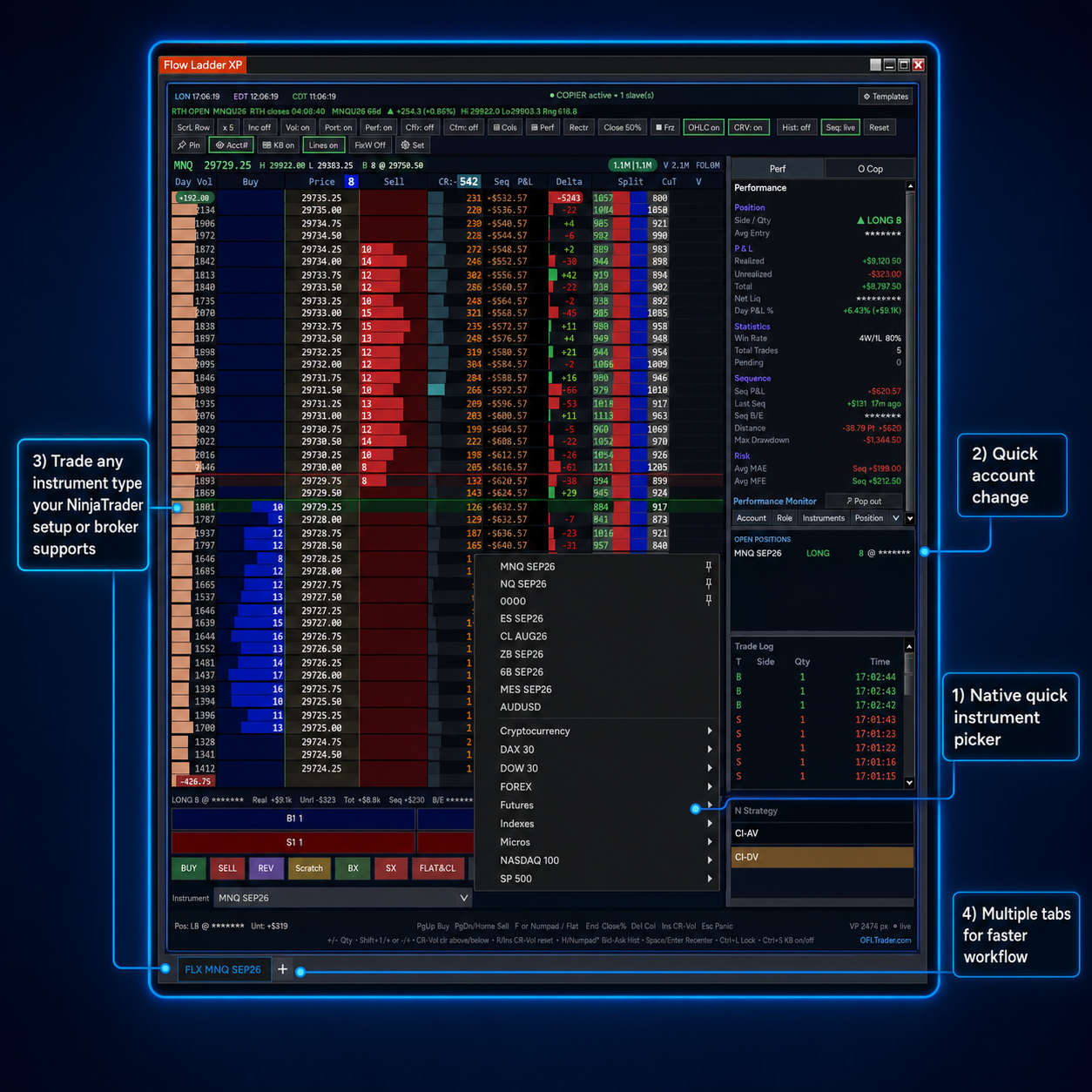
Multi-account switching, emergency close and hard risk gates built for prop-firm rules.

The Complete Cockpit

Everything You Need to Read Flow

Native NinjaTrader 8 Addon

A true SuperDOM addon using NT8’s own order routing and data feed. Nothing to bridge.

CR-Vol Volume Profile

Traded volume builds at every price level, with instant one-tap reset.

Sequence P&L Heatmap

Realised P&L and break-even per sequence, mapped onto the ladder.

Delta & Split Volume

Net buying vs selling and split volume, by RTH, 24h or custom session.

Live Performance Panel

Position, P&L, win rate, MAE/MFE and drawdown always visible.

Multi-Account Monitor

Account, role, instruments, position and net liquidity across accounts.

Blazing-Fast Rendering

Per-frame rendering with ms latency and a live connection monitor.

Keyboard Shortcuts

Every critical action — buy, sell, reverse, flatten, recenter — on a hotkey.

Multiple Ladders & Accounts

Run many ladders, accounts and instruments, each one-click to open.

Flow Ladder XP professional order-flow DOM with trade copier, live market depth, volume profiles and millisecond latency status
Speed, Trade Copier and Latency Control

Execute Faster. Copy Trades With Confidence.

Flow Ladder XP combines a responsive professional DOM, integrated trade copier and live millisecond latency monitoring in one focused workspace. Track connection performance directly from the status bar, manage multiple accounts and copy trades across selected accounts without losing sight of market depth, volume or active orders.

✓ Integrated multi-account trade copier
✓ Millisecond latency view on status bar
✓ Smooth real-time market updates
✓ Clear volume at every price

Monitor speed, manage accounts and copy trades from the same professional order-flow workspace—built to keep every execution clear, controlled and efficient.

Almost 100% Customizable

Make It Truly Yours

Every trader reads the book differently. Flow Ladder XP bends to how you work.
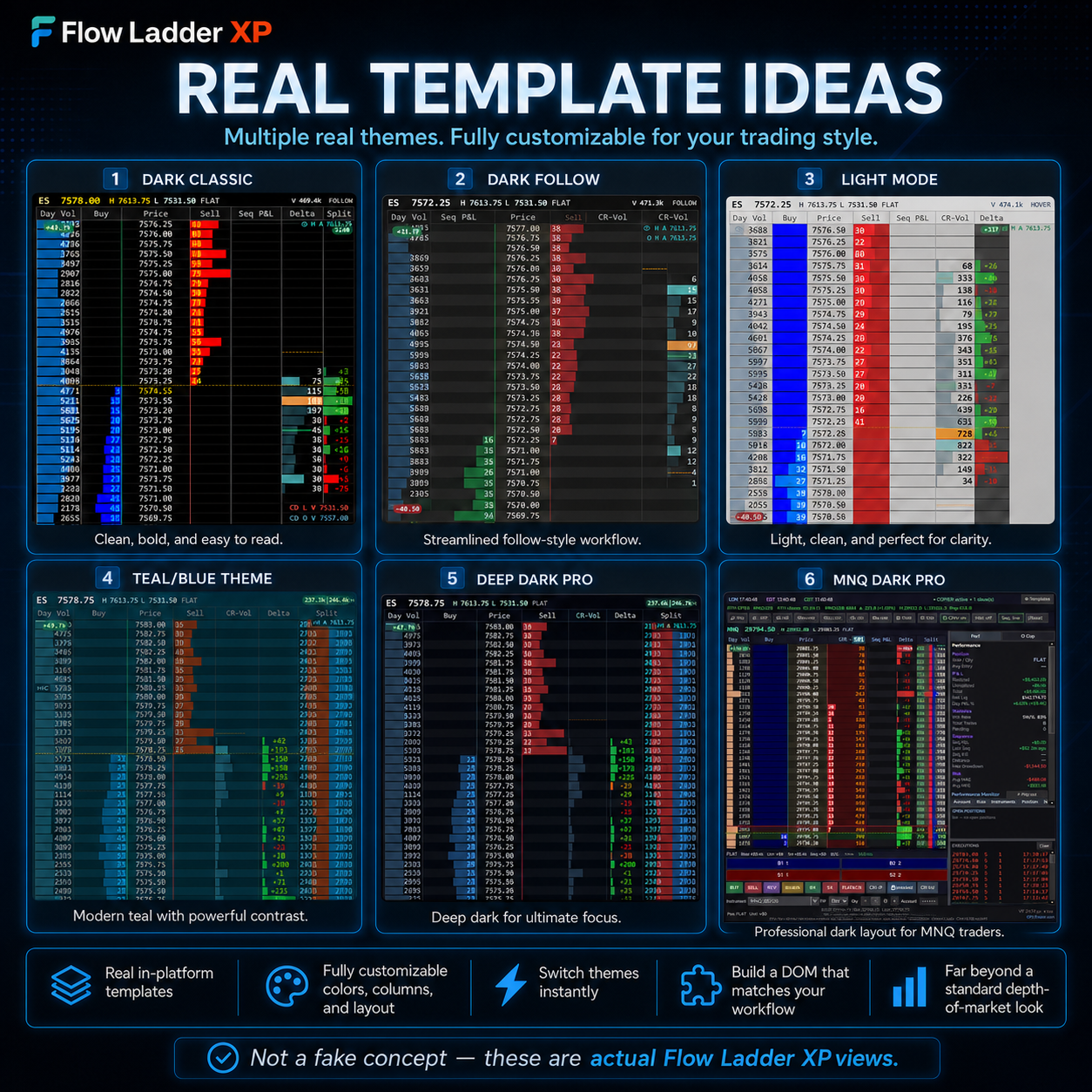
Flow Ladder XP settings and templates
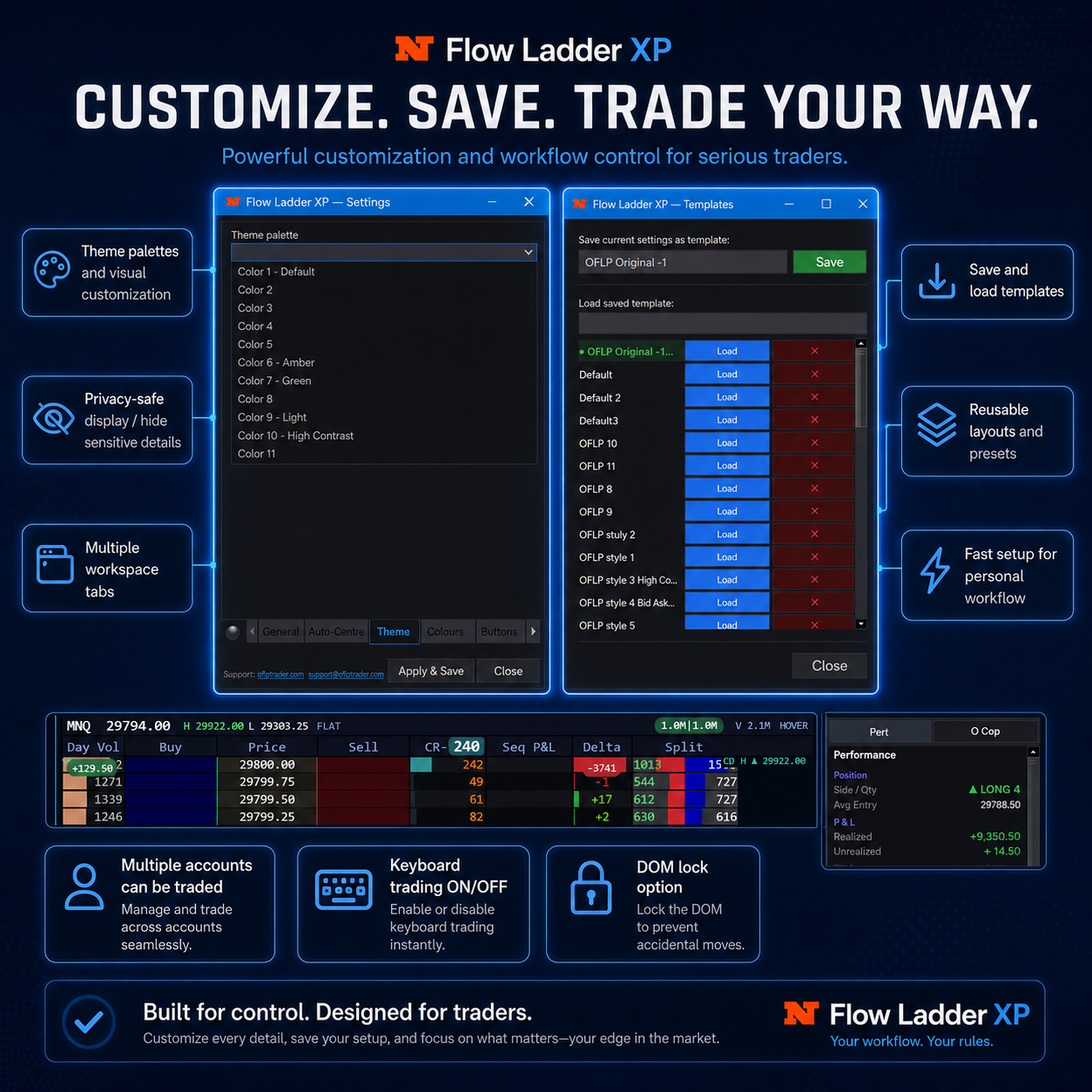
Settings & saved templates
Flow Ladder XP template presets
Ready-made template presets
Flow Ladder XP full DOM overview
Full DOM overview
Your colours
Your fonts
Columns on/off & reorder
Multiple built-in theme presets
Custom reference lines
Save your layout

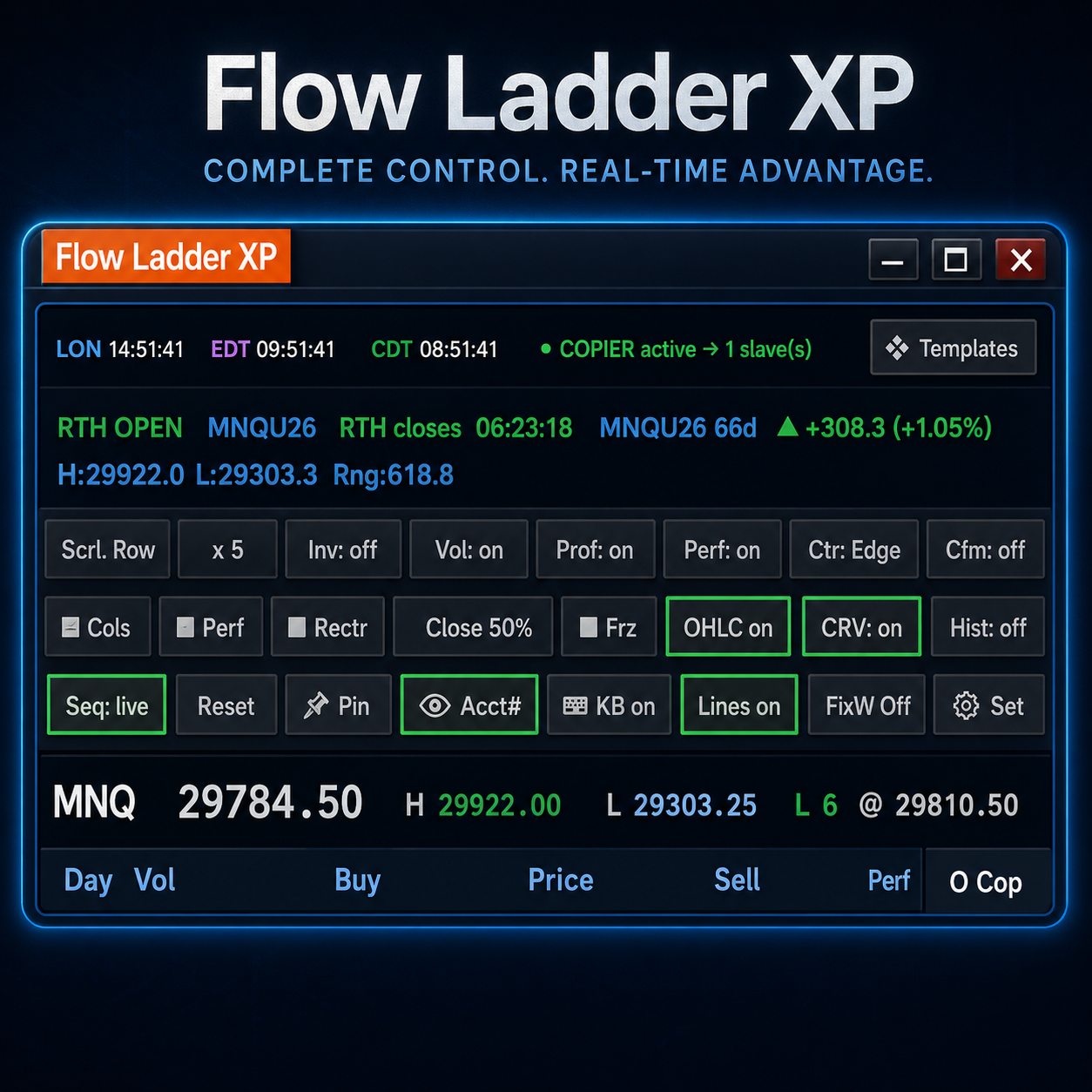
The configurable display also includes a market clock, contract info & expiry, the day's range, and OHLC today / yesterday toggles — show only what you want to see.

Flow Ladder XP professional order-flow DOM with live market depth, volume profiles and trading controls
Speed and Responsiveness

See the Market Move. React Without Delay.

Flow Ladder XP is engineered for traders who cannot afford a slow, cluttered or unresponsive DOM. Market depth, volume and order-flow activity are processed directly from your trading platform and displayed in a smooth, highly responsive ladder built for fast decision-making.

✓ Smooth real-time market updates
✓ Clear volume at every price
✓ Built-in latency monitoring
✓ Designed for fast markets

Less time waiting for the ladder to catch up. More time focused on execution, risk and the next trading decision.

Risk & Account Protection

Built for Prop & Disciplined Trading

Auto-Cancel When Flat

Working orders auto-cancel the moment you’re flat — no stray orders left behind.

Timed Order Shutdown

Set a cutoff time for prop sessions and orders shut down automatically.

Emergency Kill

One-click flatten all positions and cancel every working order instantly.

Orders on the DOM Header

Your working orders are shown clearly on the ladder header at all times.

Flow Ladder XP NinjaTrader 8 DOM with automatic account connections, trade copier and millisecond latency monitoring
Native NinjaTrader 8 Integration

Open in One Click. Trade Without the Setup.

Flow Ladder XP works directly inside NinjaTrader 8, automatically using the broker, data-feed and supported prop-firm accounts already connected to your platform. There is no separate account setup, credential entry or instrument configuration—open the DOM from the NinjaTrader menu and start working immediately.

✓
Automatic Account Detection Connected broker and supported prop-firm accounts appear automatically from NinjaTrader 8.
✓
True One-Click DOM Launch Open Flow Ladder XP directly from the NinjaTrader menu without launching a separate platform.
✓
Integrated Trade Copier Copy trades across selected connected accounts from the same focused trading workspace.
✓
Millisecond Latency Status View live connection latency in milliseconds directly on the status bar.
✓
Unlimited DOMs and Tabs Open as many DOM windows and tabs as your computer can comfortably support.
✓
Native Instrument Lists Use your existing NinjaTrader instrument lists without rebuilding watchlists in another platform.

No duplicate connections. No imported watchlists. No time wasted rebuilding your workspace. Flow Ladder XP uses your existing NinjaTrader 8 environment so you can move from platform connection to professional DOM execution in seconds.

Built natively for NinjaTrader 8

See Flow Ladder XP in Action.

A 3-minute highlights reel of the ladder in a live session — the key moments, not everything.
Flow Ladder XP demo
3 min · Quick highlights
Pricing

Simple, Honest Pricing

Monthly
£30/mo
Billed monthly · + applicable tax at checkout
Full Flow Ladder XP
All updates included
Email support
14-day money-back guarantee
Start 14-Day Trial
BEST VALUE · 2 MONTHS FREE
Annual
£300/yr
Billed annually · + applicable tax at checkout
Full Flow Ladder XP
All updates included
Email support
14-day money-back guarantee
Start 14-Day Trial
14-day money-back guarantee. Every payment, including renewals. Email us within 14 days and we refund in full — no reason needed, no argument.

14-day free trial · No card required · One price, software and live trading included — no hidden second subscription. Prices exclude tax; any VAT or sales tax that applies is added at checkout based on your location.

Questions & Help

Installation, licensing, troubleshooting and billing — in plain English. If your question is not here, email us and we will answer it.

General

Flow Ladder XP runs as an addon inside NinjaTrader 8 on Windows. It is not a separate application, and it is not NinjaTrader's built-in DOM — it is a complete, independent professional depth-of-market ladder, built from the ground up, that opens in its own window inside the platform you already use.
No. One price includes the software and live trading. There is no second subscription and no per-account charge.
Any broker that connects to NinjaTrader 8 works. You are not limited to NinjaTrader Brokerage — if the platform can connect to it, Flow Ladder XP can trade it. It reads the market data and account information NinjaTrader already provides.

Every account is detected automatically, with no additional setup. Connect in NinjaTrader as you normally would and your accounts are simply there, ready to select. Depth of market comes from your data feed, so the detail you see depends on the feed you are subscribed to.
Yes, and you are not limited to any particular firm — if your prop firm's account connects to NinjaTrader 8, Flow Ladder XP works with it, and the account is detected automatically alongside your others. The built-in risk controls, emergency close and preset order buttons were built with prop-firm rules in mind. Check your firm's own rules about third-party tools before you trade.
Everything. Across every account connected to NinjaTrader 8 — not just the instrument on the ladder, and not just the account you happen to be trading.

In one action it closes every open position, cancels every pending order, and stops every copier.

It is not limited to trades you placed from Flow Ladder XP. Anything opened from NinjaTrader's own DOM, a chart, or any other window is closed too — if the account is connected, it is covered.

It is built for the moment when something has gone wrong and you need to be out of everything at once, without hunting through windows to find what is still working.
No. Flow Ladder XP is a manual trading tool. It displays market data and makes order entry and management faster, but every decision and every click is yours. It is not a signal service and not trading advice.

Installation & setup

About two minutes, with the installer in your download.

1. Download FlowLadderXP.zip from the link in your email and extract it (right-click → Extract All). Keep every file together in the same folder.
2. Close NinjaTrader 8 if it is open.
3. Double-click FlowLadderXP-Setup.exe and click through the installer, accepting the licence agreement when prompted. It copies one file into your NinjaTrader 8 folder — no admin rights needed. A restart of your computer afterwards is recommended.
4. Start NinjaTrader 8. In the Control Center click New and choose Flow Ladder XP. It opens as its own window — you do not add it to a SuperDOM.
5. The activation dialog appears. Enter the email your licence is tied to and your licence key, then click Activate.

If Windows shows a blue “Windows protected your PC” warning, that is normal for newly published software — click More info, then Run anyway. If your antivirus blocks the installer, use the Install Flow Ladder XP.bat in the same folder instead; it does exactly the same thing. A full step-by-step guide with screenshots is in the Start Here file inside the download.
Two things to check. First, that you fully closed and reopened NinjaTrader 8 after installing — not just a chart or DOM window, but the whole platform (a computer restart is the most reliable). Flow Ladder XP then appears in the Control Center's New menu, ready to open. Second, if it is still missing, the file may not have landed where NinjaTrader reads from — use the Install Flow Ladder XP.bat fallback in the download, or copy FlowLadderXP.dll by hand into Documents\NinjaTrader 8\bin\Custom, then restart NinjaTrader. If it is still not there, email us and we will help.
Subscribers don't need it — your licence key is emailed to you automatically when you subscribe, and you activate with your email and key. The Machine ID only matters for free trials, where keys are issued by hand: it is shown in the activation dialog when you open Flow Ladder XP, in the format XXXX-XXXX-XXXX-XXXX (you can also reach it any time from Tools → Flow Ladder XP Licence). Copy it from the dialog and send it to us, and we will issue your trial key.
It is a short code our software generates from your computer, used to tie your licence to your machine so the licence you paid for opens on your computer and not on someone else's. It is not your NinjaTrader licence and not your Windows product key. It contains no personal information, no account details and nothing that identifies you, and it is of no use to anyone else.
No. Flow Ladder XP runs locally inside your own NinjaTrader installation. Your orders, positions, account details and trading activity stay on your machine — we never receive them. The only thing the software sends out is a licence check.

Licensing & activation

Two things: your licence key and the email address your licence is tied to (for subscribers, the email you paid with; for trials, the email you requested the trial with). Both must match, along with the machine you activate on. If any of the three does not match, the ladder will not open — this is what stops a copied licence working on someone else's computer.
Use the exact address your licence is tied to. A different address on the same mailbox — for example the gmail.com and googlemail.com spellings — counts as a different address. If you are not sure which one we have, email us and we will tell you.
After several failed attempts the activation dialog pauses for a short time, and the wait gets longer with each further failure. This only counts genuine refusals, not connection problems. Wait for the time shown, then try again with the correct details. If you are stuck, email us rather than guessing — guessing makes the wait longer.
No. After your first activation the software keeps a signed licence file that lets it open offline for up to three days. It refreshes automatically whenever you are online, so in normal use you will never notice it. A machine that is offline for longer than that will need to connect once to refresh.
A trial is limited to one machine. Paid subscriptions cover up to two computers — install on each and activate with the same email and key. If you change computer or rebuild your machine, email us and we will move your licence over.
The ladder stops opening. Nothing is deleted and your settings stay where they are — renew and it opens again. If you are mid-session when a licence lapses, the software will not close your window under you; the refusal happens when you next open the ladder.

Troubleshooting

Nine times out of ten it is one of the three activation details not matching — email, key, or machine. The refusal dialog has a Copy Details button that copies everything we need to diagnose it: your machine ID, the masked key, the email on file and the current state. Paste that into an email to us and we can usually answer in one reply.
Flow Ladder XP writes a support log to Documents \ NinjaTrader 8 \ FlowLadderXP \ signature-check.txt. It records licensing events only, and your licence key is always masked. Attaching it to a support email is the fastest way for us to see what happened.
Check for a trailing space — keys copied out of an email client often carry one. Paste into the box and press the button rather than pressing Enter, and make sure the email box above is filled in too.
Email support@oflptrader.com with what you were doing and what you saw, and attach the log file if you can. We are a small, trader-run operation and we read every message — you are always talking to someone who knows the product.

Trial, billing & refunds

Yes — 14 days, no payment card required. Request it from the trial page, we email you the download, and you send us the Machine ID the software shows you. We issue your trial key by hand, usually within one business day.
Email us. We would rather you evaluated the software properly than bought it on a guess, and we will consider extending your trial.
£30 a month or £300 a year. Prices are shown excluding tax. Where tax such as VAT applies, it is added at checkout based on your location — so the total you pay may be a little higher than the headline price. Your invoice shows the tax separately, and it is collected and remitted by our payment provider as merchant of record.
Any time, from your customer portal. Open the “Manage subscription” link (also in your account emails), enter your email, and you will be sent a one-time code to sign in — no separate password. From there you can update your card, view your invoices, or cancel. Cancelling stops future renewals and you keep access until the end of the period you have already paid for. Prefer us to do it? Email us and we will cancel it for you.
A full refund within 14 days of any payment, including renewals — not just your first one. Email us within 14 days and we refund in full. You do not need to give a reason and we will not ask you to justify it. When you cancel or receive a refund, no further payments are taken and you keep access until the end of the period you have already paid for. Full detail is in our Refund Policy.
OFLP is the provider and licensor of the software. Your subscription is sold through Link (Stripe Managed Payments), which acts as merchant of record and handles the payment and any applicable tax — so a name such as Link or Stripe may appear alongside the charge on your card or bank statement. We never see or store your full card details. Billing and refund questions still come straight to us at support@oflptrader.com — we handle them for you.
Still stuck? Email support@oflptrader.com — we aim to reply within one to two business days (UK time).

Your Trading Stays Yours

Runs Locally

Flow Ladder XP runs entirely inside your own NinjaTrader 8. Your orders, positions and account data never leave your machine.

Licence Check Only

The only thing that ever connects out is a periodic licence check. No trading data is collected, sent, or sold.

Secure Activation

Your licence is tied to your machine with cryptographically signed activation and a secure offline fallback.

Start Trading With an Edge Today.

Try Flow Ladder XP free for 14 days.

Start Free Trial
Scroll to Top

Trading futures involves substantial risk of loss and is not suitable for every investor. You can lose more than you deposit. Flow Ladder XP is trading software, not advice — every decision and outcome is yours. Read the full risk disclosure